SimBook by Indoor Golf Management
Switch Your Indoor Golf Booking Software
A booking-system switch is a change to your operating process. Inventory what you have, rehearse the new flow, and pick a cutover date with enough time to reconcile both systems.
Inventory the commitments you already made
Export future reservations, customers, active memberships, unused hour or visit balances, waivers and discounts where your current system permits. Keep the original export intact. Identify bookings that were already paid, deposits held elsewhere and memberships due to renew near the cutover.
A CSV can carry records, but it does not guarantee that saved payment methods, subscription mandates or signed legal documents transfer. Check each category separately. Keep necessary historical records available after the old booking link is removed.
Rebuild the rules before importing the people
Configure bays, opening hours, booking intervals, rate windows, member benefits and blocks. Review time zones and handedness restrictions. The same customer data can behave very differently if the rate or cancellation rules change underneath it.
Rehearse the booking and the shift
Test a guest booking, member redemption, peak-rate booking, cancellation, private-event block and league night. Ask a front-desk staff member to handle a walk-in and move a reservation. Compare each result with the promise you made to the customer.
Cut over, communicate and reconcile
Choose when the old system stops accepting new bookings. Update your website and published links, explain the member sign-in process, and check the first day’s reservations in both systems. Confirm billing does not renew twice. Keep a recovery plan for any records that fail to move.
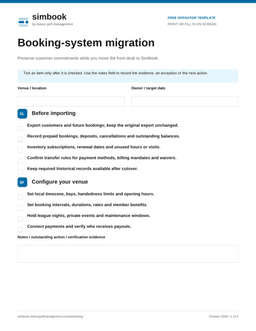
Download the checklist below to assign an owner and a verification step to each part of the switch. Bring it to your free onboarding call so we can work through your particular venue.
Free PDF templates
Fill in these branded worksheets on screen or print them for your team. No email or signup required.