SimBook by Indoor Golf Management
Guides & Templates for Indoor Golf Operators
Plan the venue workflow before you automate it. Use these guides and tools to work through bookings, member capacity and the switch from your current system.
Choose a booking system using a real shift
The important test is not whether a feature name appears on a website. List the reservations, member visits, walk-ins and league holds your desk handles in a typical busy shift. Work through that list in each demo and check the rate, availability and customer record.
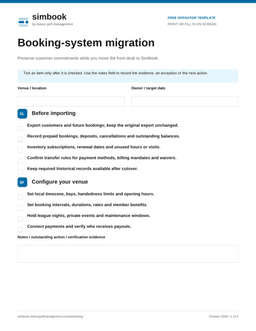
The booking guide and tee-sheet guide show where each workflow lives. The comparison and switching checklist help you turn a software choice into a workable migration.
Price memberships against the capacity they use
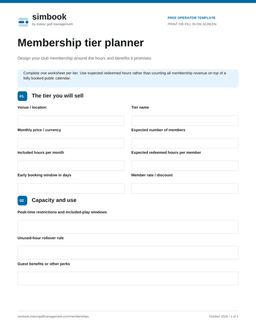
Estimate expected member-hour use, rather than treating every membership payment as additional revenue on top of a full public calendar. The bay-revenue calculator subtracts expected member use from sellable public capacity so the same hour is not counted twice.
Use actual redemption data as it becomes available. A member with eight included hours may use two or may use all eight. The assumptions should be visible to anyone making the pricing decision.
Use the tools without a signup
The calculator runs in your browser, and the migration checklist is a direct download. You do not need to submit your email to use either. Save your own copy, replace example inputs with your venue’s numbers and bring any questions to a demo.
Free PDF templates
Fill in these branded worksheets on screen or print them for your team. No email or signup required.